

Key takeaways 🌟
Tech is shifting from UX (user experience) to AX (agentic experience), as AI agents are becoming primary users of digital products alongside humans.
That shift in itself isn’t a problem. The problem is assuming agent-ready automatically means human-ready, and forgetting human-centered design as a result.
Relying on the text prompt as a universal interface is a UX regression: it puts all the cognitive load, and all the blame for bad results, on the user.
Designing AI well means building for agents and humans at the same time, structured systems for machines, accessible and forgiving interfaces for people, without sacrificing one to chase the other.
I was just wrapping up a meeting when we opened the topic of AX (agentic experience) right by the door. You know, that typical parting small talk where you throw in a quick joke between the door handle and the hallway.
But that thought stuck with me for days: “word on the street” is that UX (user experience) is mutating into AX – agentic experience.
I wanted to get my head around it, and it turns out I’m not the only one. According to Stu Green, AX is the “next hot thing.” And judging by the steep increase in Google searches for that topic it certainly seems to be that way.
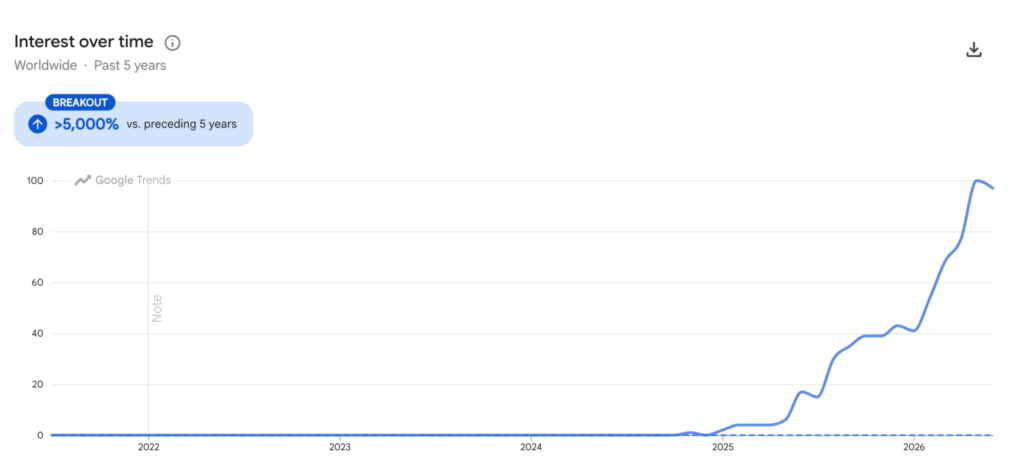
Google Trends: search interest in “agentic experience” rising sharply in early 2025 with increasing trend through today.
The term started being thrown around in early 2025 (mostly thanks to Netlify’s CEO, Mathias Biilmann) and describes the experience that AI agents have as the primary users of a product.
Today, we design websites and digital products for humans, which makes for an environment that is often difficult for machines—agents to navigate or interact with.
In her guide for UX designers, Aida Malkic defines AX as a new intersection between agents, humans, and developers.
Simply put: we now must start designing for the agent as a fully-fledged user.
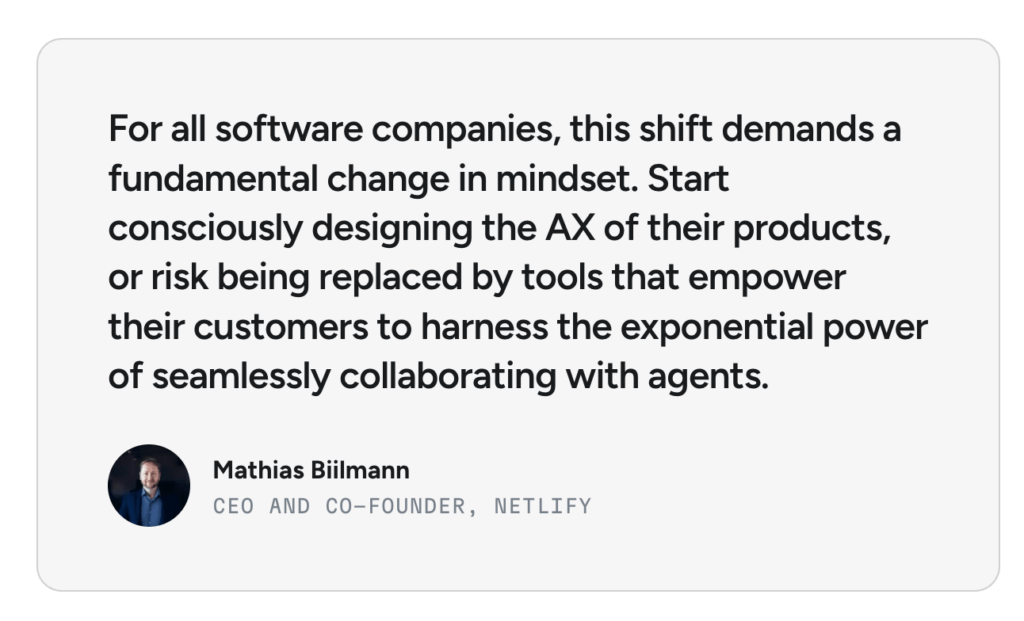
Quote of Mathias Biilmann explaining why he believes AX is important
Fast forward a few days.
My devs and I were debating a feedback form for an AI tool we’re currently building. When I wanted to check the status of the feature, I was told it was basically “done.”
Investigating a little deeper, it hit me: this wasn’t a feedback form as requested. We gave the user zero space to write anything. The system just logs the session, and the machine is supposed to evaluate it, with our non-sharp hypothesis over it.
It left me with this nagging unease.
We are blindly trusting the machine while completely ghosting the human dialogue. And this isn’t just a one-off situation; it’s a symptom of how the tech industry treats AI as a product today.
Why AX and UX aren’t the same problem
Here is the issue I would like to address: AX asks us to design for agents, which requires structured data, predictable APIs, and machine-readable content, etc.
On the other hand, UX asks us to design for people, which requires intuitive guidance, visual cues, and empathy.
At first glance, these look like competing goals. They aren’t. They are two completely separate design problems that the tech industry is lazily trying to solve with a single solution: the text prompt.
Designing for agents means giving machines clear, specific data to process. It was never supposed to mean forcing humans to speak like machines, too.
The flaw we often see in product design today isn’t that we are building for AX. It’s that we are overoptimizing for it or have the wrong assumption that once an interface is agent-ready, it is automatically human-ready.
It rarely is; in fact, it’s often the exact opposite.
The prompt as a regression in design
When it comes to UX or HCI (which some claim is a dead discipline anyway!), we’ve somehow managed to regress. It’s as if we threw out everything we ever learned and started treating AI assistants with more respect than actual people.
Sure, we need to develop agent “experiences,” but we can’t just abandon the human and their daily interaction with technology in the process.
For me, the ultimate proof of this regression is the prompt itself. Its very existence.
When I was venting on LinkedIn recently about how instead of AI adapting to us, we are increasingly and rigidly adapting to AI, Christiane Grünloh perfectly nailed the core of the problem:
Today, if people complain about AI tools not delivering, they are immediately questioned: what prompt did you use? Which model? That’s back to blaming the user for not „getting“ it.
We (used to?) have a golden rule in design: 95% of the problems between the chair and the keyboard aren’t the human’s fault.
With AI, the tables have turned. The user is back to being the one who “doesn’t get it, doesn’t know, and prompts poorly.” The tech scene was immediately flooded with courses on “miracle prompts.”
It gets dangerous when this mindset spills out of the tech bubble—among everyday people who don’t understand technology and have absolutely no desire to.
By demanding perfect prompts from users, we are forcing them into a machine-like experience. We want them to talk to tech like computers, not like humans.
Why prompting is a bad interface and the (in)exclusivity of prompting
I see this firsthand with my deaf brother. Texting was a revolution for him and video calls completely changed our lives as a family. But AI? It’s often frustrating, largely due to the rigid barriers posed by written prompting.
Sometimes it’s funny, but more often than not, we end up on a joint investigation into where on earth the AI even pulled its answers from.
Prompting became the universal interface without anyone asking if it’s actually usable. AI masquerades as natural conversation, but it’s often just a glorified return to command-line logic: if you don’t type the exact right command, the system simply blanks you.
The only difference is that back then, we knew we were coding for a machine. Today, we feel like we’re speaking naturally—and when the AI fails, the blame is shifted right back onto the user.
Back in 2025, UXtweak founder Eduard Kuric questioned whether prompting is really the best interface for generative AI.
He highlighted three core issues:
⚠️ fragility (small wording changes produce different results)
⚠️ prompt hacking (outputs are easy to manipulate)
⚠️ accessibility (many users struggle to write effective prompts).
His conclusion still resonates:
Prompting is a transitional stage in the evolution of human-AI interaction. It must give way to more sophisticated, stable, and user-friendly methods.
Ego in AI
AI doesn’t have an ego, but it sure acts like it does. The issue with AI outputs isn’t just hallucinations. It’s the fact that AI:
- a) won’t admit it’s clueless,
- b) gives zero guidance on how to use it right.
We are chasing superhuman intelligence to solve all our life problems. We want assistants to know everything, and we design agents to fix everything at once.
But like all “know-it-alls”, they know a little bit about everything and nothing deeply – and they will never, ever admit it. Most AI tools welcome you with a confident “ask me anything” and deliver exactly that: anything.
At least in this, AI behaves like a human: driven by its ego, it refuses to say “I don’t know.”
From a business perspective? Sure, understandable – confidence sells. From a design perspective? It’s a dark pattern.
The second issue is that AI doesn’t ask enough questions. It only queries you to keep you hooked in the chat. AI assistants rarely ask for context, double-check if they understand the problem, or dig into what we are actually trying to solve.
If you went to a doctor or a mechanic, you’d be highly suspicious if they gave you a diagnosis without looking “under the hood.” We should be just as suspicious of AI’s instant answers.
AI as a design problem
Most AI interfaces don’t show the user when an answer is a wild guess versus a factual certainty. They don’t offer clear visual cues and don’t guide users step-by-step toward better results.
Agentic experiences today are mostly restricted to emergency moments “where the human needs to take back control,” rather than providing continuous, barrier-free control.
The result is a system that quietly dumps all the responsibility for quality onto the user – from framing the question to interpreting the answer.
We are simply not designing these products well enough yet. This is exactly what I discussed with Vitaly Friedman on our UX Research Geeks podcast in the episode on Designing AI products.
As Vitaly beautifully put it during our chat:
Prompting alone is not a complete interface. Designers still need to create discoverability, guidance, trust, and clarity. AI products need intentional UX, not just conversational layers.
Instead of building proper guidance, teams just rush to plug in AI, shifting the cognitive load to the user.
Instead of writing endless guides on how to “hack” AI, we should push for AI that is transparent by design about what it can and cannot do.
It should guide users by asking real questions, not exclude people just because they don’t know the magic words.
Designing AI as an expression of responsibility
We find ourselves in a technocratic era where we’ve become thrilled by the technology and are forcing people to adapt to it.
We are still in the early stages of AI, and it’s a natural developmental stage – much like the early days of the web, when you seemed “incompetent” if you didn’t know basic HTML.
The risk that we might create a world where we exclude people just because they don’t know how to interact with AI stands.
When we talk about the threats of AI, this mindset is all the more dangerous – it gives people a sense of inferiority toward technology instead of technology serving them.
*My thoughts and opinions are my own. AI helped with translation and editing the text.
Extra resources:
For more guidelines on how to design AI experiences, we recommend watching our podcast episode Designing AI products (embedded below).
You can also check out the guidelines from People + AI Research (PAIR) by Google and Human-AI Interaction HAX toolkit from Microsoft for practical guidelines and examples.







📌 Best AI design practices:
Design for humans AND agents: Do we need to explain this further?:)